MetriCup Guide
Coffee Shop Labor Cost: What the Number Should Be
 Rich Manalang
Most coffee shop owners know labor is their biggest controllable cost. Very few know their actual number — or whether it's good.
The metric that matters: SPLH
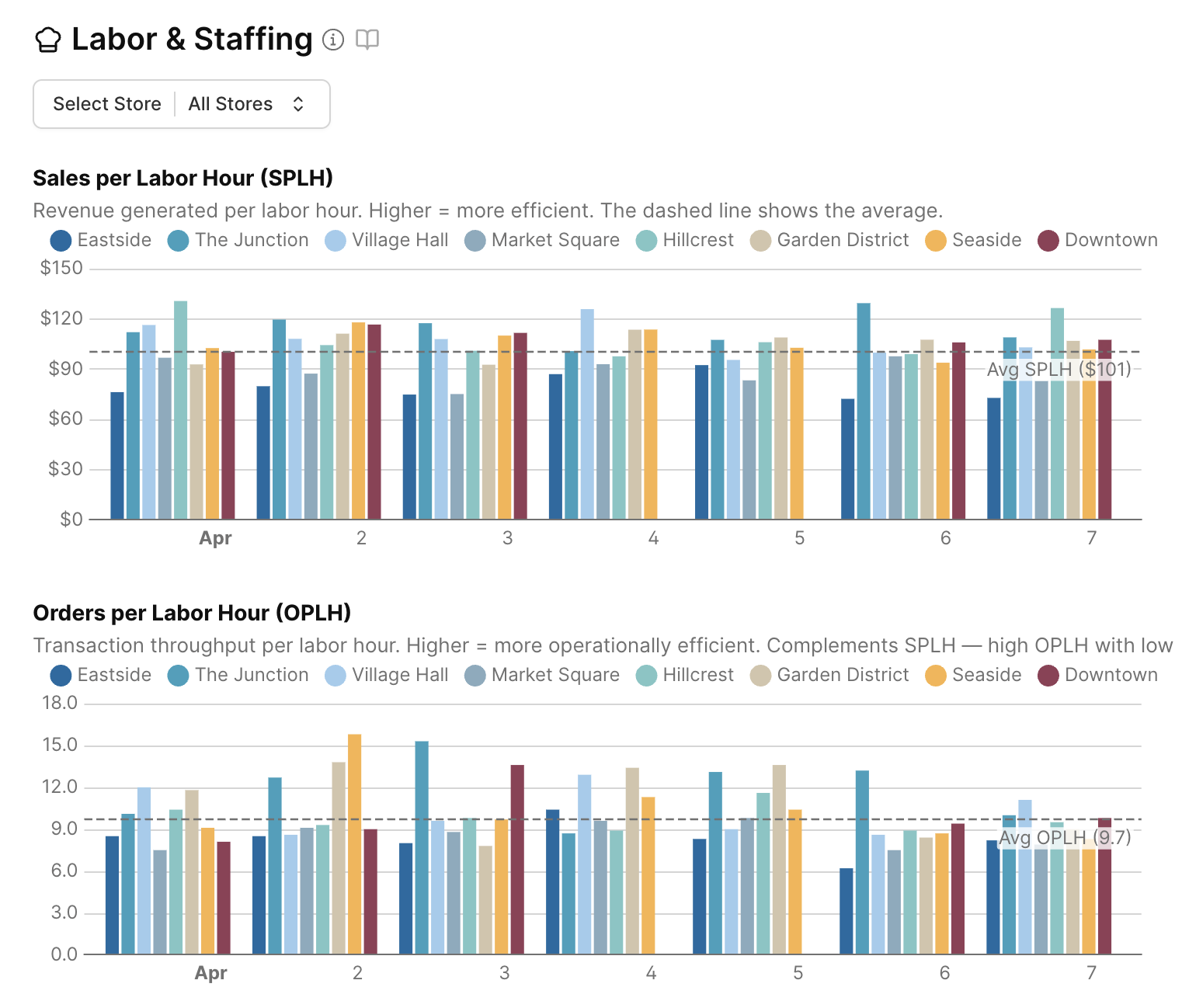
Forget labor cost percentage for a moment. The most useful number in specialty coffee is Sales Per Labor Hour (SPLH) — how much revenue your team generates for every hour worked.
The formula is simple:
SPLH = Net Sales ÷ Total Labor Hours
Example: $4,200 in sales on a day your team worked 80 hours = $52.50 SPLH
For a pure beverage-focused café with counter service, a healthy target is $80–120 per hour. But that number shifts depending on your shop's model.
If you run a full kitchen with food service and a wait staff, expect a lower SPLH — the additional labor required to prepare and serve food means more hours per dollar of revenue. That doesn't mean you're inefficient; it means your benchmark is different. Comparing a full-service café-restaurant to a grab-and-go espresso bar on the same SPLH scale will mislead you.
The right way to use SPLH is to compare your own stores to each other (same model, same format), and to track your own trend over time — not to hit an industry average that may reflect a completely different type of operation.
What your SPLH number is telling you
Well below your own baseline — you're likely overstaffed
Each labor hour is generating less revenue than it should for your shop type. This typically means too many people on shift for the actual demand — slow days with full crews, or long shifts on low-volume mornings. Review your scheduling against historical sales patterns by day-of-week.
Consistent with your historical average — on target
Your team is generating strong revenue relative to hours worked for your model. Focus on maintaining consistency across locations and days, and compare stores with similar formats to each other.
Well above your baseline — watch customer experience closely
High SPLH looks great on paper but can mask a problem: a team stretched too thin. When staff is running at maximum throughput, service quality suffers — wait times lengthen, mistakes happen, baristas burn out. Check your tip percentage alongside SPLH. Declining tips at high SPLH is a signal you've crossed the threshold.
Why SPLH beats labor cost percentage
Labor cost percentage (labor spend ÷ revenue) is useful for accounting but it hides operational reality. Two stores can have identical labor cost percentages but very different efficiency — one with $18/hr baristas working lean shifts, another with $15/hr baristas burning twice the hours.
SPLH cuts through this. It measures output directly: how much revenue did each hour produce? That's what you can actually manage on a daily basis.
The staffing problem most owners don't see
Most POS systems show you what happened after the fact: sales for yesterday, the past week, the past month. They don't show you how many labor hours it took to generate that revenue, or whether you were over- or under-staffed relative to demand.
The result is scheduling by feel — an experienced manager uses intuition, or you copy last week's schedule and hope it works. This is fine when your intuition is calibrated. It falls apart when volume shifts seasonally, when a new location has different patterns, or when you're trying to optimize across multiple stores.
Holidays and weather move your numbers more than you think
One underappreciated insight: the same holiday hits different locations completely differently. An office-district café might lose 80% of its Presidents Day sales (nobody's at work). A residential café might gain 30% (everyone's home and wants coffee).
If you schedule both locations the same way on that Monday, one is catastrophically overstaffed and one is slammed. A blanket holiday policy doesn't work across a multi-location operation.
Weather follows the same logic. A walk-up café might see 23% lower revenue on rainy days. An indoor café with a drive-through might barely notice. These aren't guesses — they're calculable from your historical data.
How to start tracking this today
You need two data sources: Square (or your POS) for sales, and your scheduling/timekeeping system for labor hours. The challenge is that most shops run these in separate tools — Square doesn't show labor, and your timesheet app doesn't know your sales.
If you want to do it manually: pull your daily sales from Square, pull total hours worked from your timesheet system (Square Team, Homebase, 7shifts, or similar), and calculate SPLH for each day. Track it for a month and you'll start seeing patterns.
If you want it automated across multiple locations, that's exactly what MetriCup does.
MetriCup
See your SPLH, automatically
MetriCup connects your Square POS and labor data to surface SPLH, OPLH, and staffing accuracy for every location — updated daily, no spreadsheets required.
Get early access